


You are explaining the same thing to AI for the fifth time this week: company tone, job-posting structure, interview philosophy, competency model, or performance-review principles.
This is not prompting. This is AI amnesia — and you are treating it manually, one chat at a time.
The problem with AI in HR is rarely that the prompt is badly written. The bigger problem is that every chat starts from zero, even though much of HR work is the same task with different names, dates, and details.

You only have one job. And the job is well done.
HR work is full of repeatable tasks.
You write job descriptions — and then answer similar candidate questions.
You explain policies — but before you prepare manager guidance.
You review performance wording — and you turn messy notes into something people can actually read.
The details may change, but the stable context usually stays the same: company tone, approved wording, job-posting structure, interview philosophy, competency model, policy logic, and the kind of language your company would never use.
Your chats should not start from zero. When you use AI in one-off chats, you keep rebuilding that context manually.
You paste the same template and remind the model not to sound like a legal robot, a startup bro, or a motivational poster from 2012.
Use workspaces, not memory tricks
Most major AI tools now have some version of a reusable workspace.
In ChatGPT and Claude, this is called a Project: a place where you can keep related chats, uploaded files, and project instructions together. You can add project knowledge and project instructions, so new chats inside the Project start with the right background.
In Gemini, the closest equivalent is Gems: custom AI assistants that can be set up for recurring tasks and given task-specific context. The names are different, the idea is the same: stop treating every chat as a blank page.
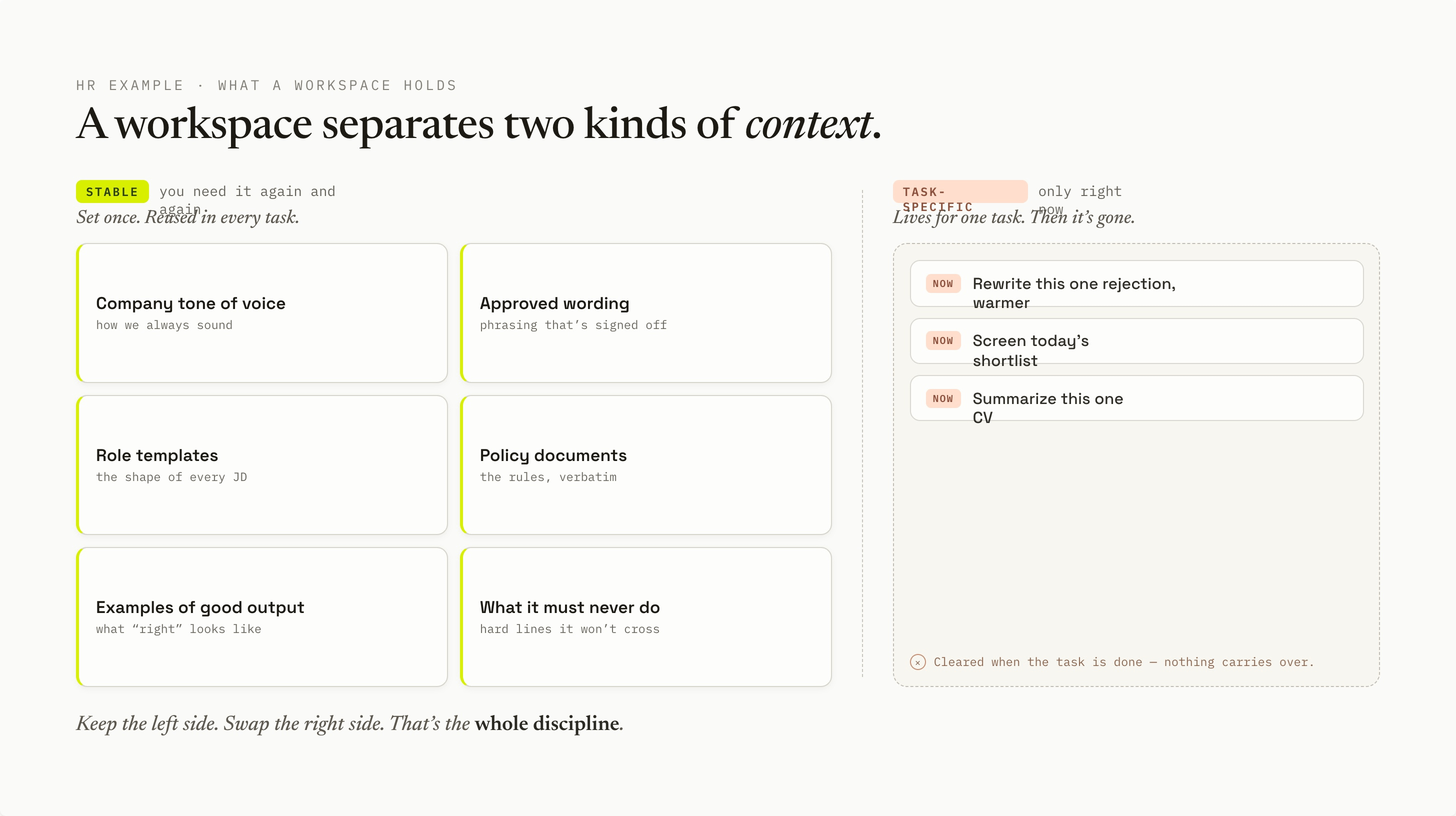
Then each new task can focus on the actual question.
Three habits that matter more than the tool you choose
The debate about “which model is best” is interesting. But for everyday HR work, it is often less important than basic context hygiene.
1. Work in separate workspaces, not one endless chat
Create separate workspaces or Projects for recurring themes. If your tool does not support Projects, use the minimum version: start a new chat for each new task.
This alone improves output quality more than many people expect.
“Hiring” can be one workspace if you mostly use AI for job descriptions and hiring-related documents. But if you use AI heavily across the whole hiring process, you may need more than one:
one workspace for job descriptions,
one for candidate communication,
one for hiring manager briefings, etc.
2. Insert the relevant part, not the whole document
If you need help with the vacation policy, paste the vacation section. Not the whole 30-page employee handbook.
If you need to rewrite one paragraph of a job description, paste that paragraph and the success criteria. Not five old vacancies “for context.”
More context is not always better context. Good context is relevant context.
The more irrelevant material you add, the more chances you give the model to grab the wrong thing.
3. Close the chat when the topic is done
Even inside a Project, do not drag unrelated tasks through the same thread.
For example, you have finished writing a vacancy and now want to generate an image for the social media post promoting it.
Is this still hiring? Technically, yes. But…
A job description needs role context, grade level, responsibilities, requirements, and inclusive language. A visual concept needs a different kind of context: audience, channel, format, brand style, mood, layout, and what the image should make people feel.
Clean desk, same filing cabinet.
What to do tomorrow
Сhoose one recurring HR task — vacancies, candidate emails, performance review, policy work — and create a dedicated workspace for it.
From now on, use that workspace only for that type of task.
In the next post, we’ll write the actual instructions for your Projects — because grabbing documents and examples in a kitchen sink is not always enough. You can adapt it for ChatGPT, Claude, or whatever — because you’ll get a concept.
Subscribe and send this to a colleague who is still afraid of CLAUDE.md. It is less scary than it looks.
And by the way,
“—” does not necessarily mean a text was written by AI.
Press Option + Shift + - on a Mac.
Or Alt + 0151 on Windows.
You’re welcome.
Now you’re AI too.