


Before we do anything, let’s take one step back.
If you think of SKILL.md as a Markdown file that lives somewhere on GitHub, full of headings, brackets, tags, and instructions written in a mildly suspicious developer dialect, the natural reaction is to close your laptop and go get a drink. I feel you.
But if you think of a SKILL.MD as, well, a skill, it becomes a much easier concept for HR.

Remember when we talked about Projects? I used the analogy that a Project is closer to a role: the broader job you want AI to help you do. Skills are the capabilities you need to perform that job — not constantly, but when a particular task requires them.
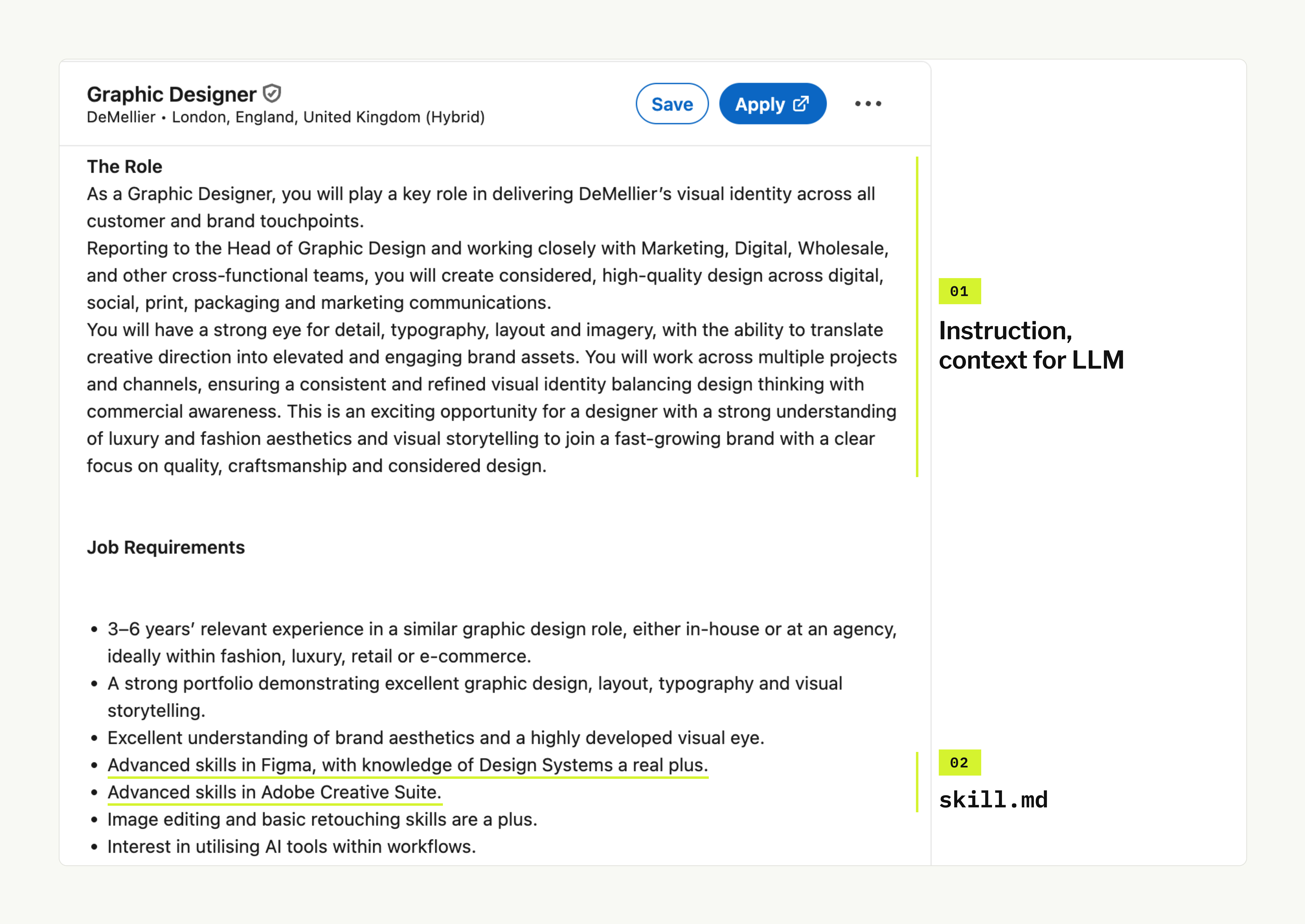
Take recruitment. To recruit someone, you need to be able to:
take a proper brief from a hiring manager;
turn it into an attractive job ad;
choose where to publish it;
run an interview;
write useful candidate feedback for the hiring manager;
write an impressive number of emails that are technically templates but, ideally, do not feel like templates.
(And we are still nowhere near the offer or actually closing the vacancy)
These are all skills that help you do the broader job of recruiting. But we all know some recruiters barely challenge the hiring manager’s requirements — and still close vacancies. Some spend screening calls asking everything except whether the person can actually do the job — and still close vacancies. Some avoid active sourcing completely, sit there waiting for applications — and still close vacancies.
Most positions get filled somehow.
But we also know that the people who are really good at these individual skills tend to produce better results. They work faster, make fewer expensive mistakes, need less supervision, and — surprise — they tend to earn more!
So what should go into a Skill?
Definitely not act as an experienced recruiter.
A good candidate for a Skill is a repeatable process with a recognisable quality outcome.
Something where you can look at the result and say: yes, this was done properly — or no, this missed an important step. And something where the quality depends on how the work is done, not just on producing a piece of text.
For example:
We want a Skill that turns messy interviewer notes into structured feedback against predefined hiring criteria — without inventing evidence, turning “I liked her” into a competency rating, or quietly making the hiring decision for us.
That is already much closer to a Skill.
We have some idea of what should come out. We can describe what good work looks like. And, importantly, we know some of the things it must not do.
At this point, we already know almost everything the Skill needs to know.
What we still haven’t done is write the file itself. But trust me, it’s not brain surgery. I’ll show you three options to make your own SKILL.MD.
How do you get your own Skill out of your head?
There are at least three reasonably painless ways to do it.
1. Ask an LLM to write the first version
This is the obvious option and perfectly fine for anyone who develops a sudden allergy to blank pages.
But I would not start with:
Write me a SKILL.md for interview feedback.
That gives the model far too much room to design the process for you. And the whole point is that you are the one who knows how this work should be done in your company.
Instead, make the model interview you.
Tell it what process you want to capture and ask it to question you about inputs, steps, decision rules, exceptions, quality criteria, and common mistakes.
For our interview-feedback example, it should be asking things like:
What information is always available after an interview?
What counts as acceptable evidence?
What should happen when there is not enough evidence for a competency?
Can an interviewer’s overall impression appear in the feedback?
What mistakes do you repeatedly correct when other people write feedback?
Answering those questions is already most of the work.
Then the model can turn your answers into the first version of the Skill.
2. Turn a successful chat into a Skill
Sometimes you have already built the process without noticing.
You gave AI a task. It produced something. You corrected it, then you corrected it again. Then you explained a rule you assumed was obvious. Then you added an example. Then you told it (for the fourth time) not to invent information that was not in the interview notes.
And finally you got exactly the result you wanted. Congratulations — somewhere inside that slightly exhausting conversation is probably a SKILL.MD.
Ask the model to extract the reusable workflow from the conversation. Some tools make this almost embarrassingly easy. In Claude, you can open a successful conversation and simply choose Turn into skill. If your model does not have that option, ask it to turn the conversation into a draft Skill.
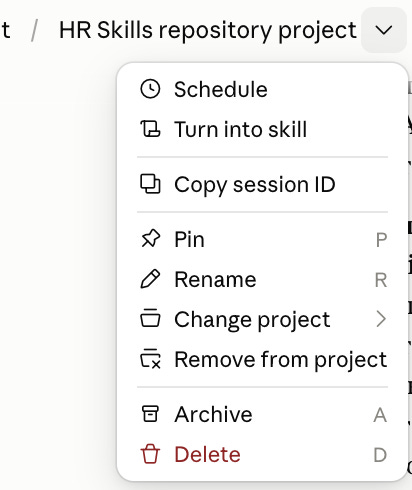
The important thing here is not to save the entire conversation as instructions.
What you need is the reusable logic behind it: the rules you clarified, the constraints you added, the examples that worked, and the mistakes you had to correct.
3. Record your screen and teach the class to a perfectly emotionless machine
This one is particularly useful when you know how to do something well but find it surprisingly difficult to explain.
Instead of trying to reconstruct the whole process from memory, show the model how you actually do it and narrate your decisions as you go.
Depending on the tool, you can share your screen or an application window, upload a screen recording, or simply provide a sequence of screenshots while explaining what you are doing.
Claude can work from your screen or screenshots; ChatGPT and Gemini can also analyse uploaded screen recordings. Features vary by app and plan.
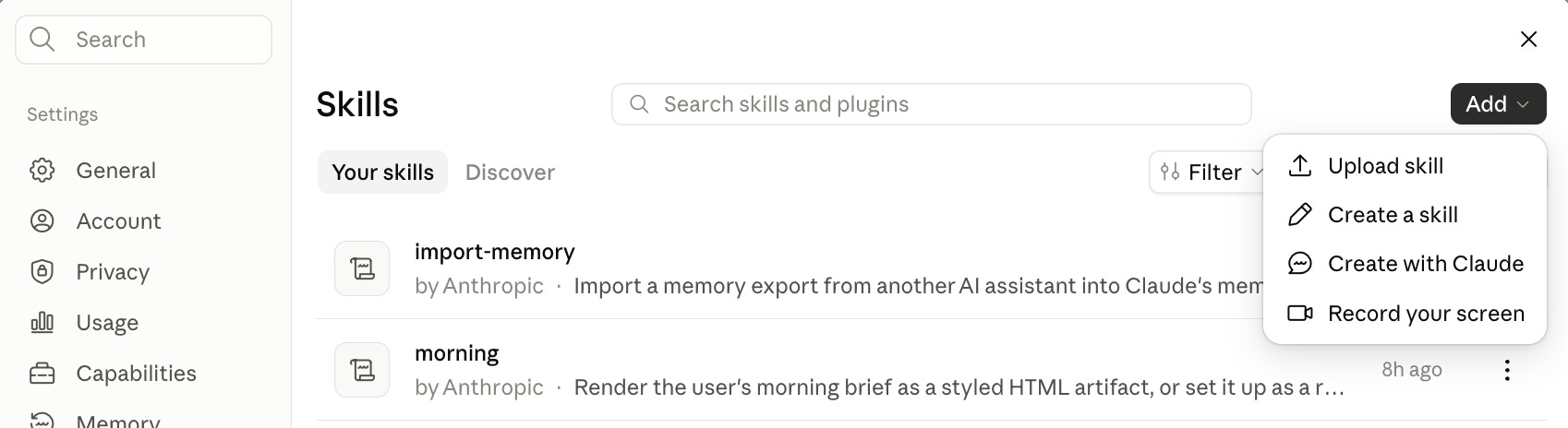
Claude: Settings — Skills — Add
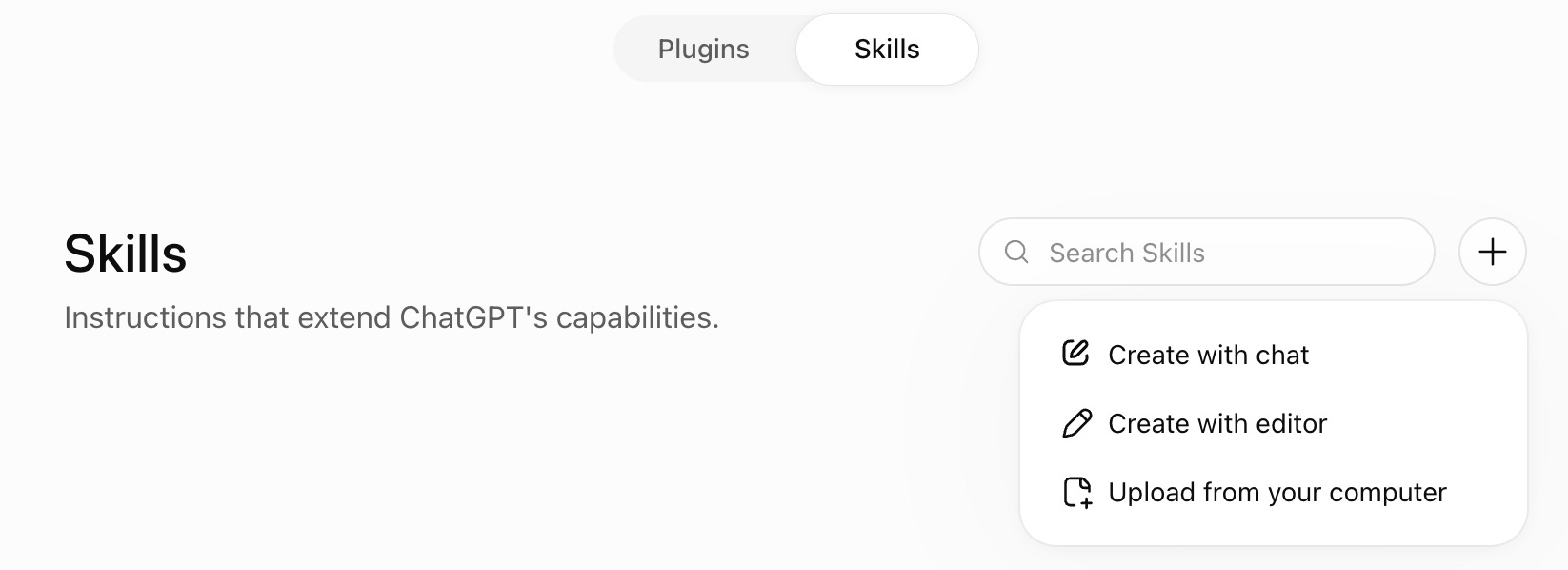
ChatGPT: Plugins — Skills — ”+”
The point is not which interface you use. The point is to make your usually invisible professional judgement visible to the model.
So, for example, record yourself turning a messy hiring-manager brief into a JD ad and explain your decisions as you go:
This is internal company language. A candidate will have no idea what it means.
I’m moving this from ‘requirements’ to ‘nice to have’ because otherwise we will unnecessarily shrink the candidate pool.
This title makes sense internally, but nobody is going to search for it on LinkedIn.
The hiring manager described a responsibility here, not a success criterion. I need to clarify what good performance actually looks like.
This is exactly the kind of professional judgement that is easy to apply and surprisingly difficult to write down from scratch.
That narration is extremely valuable. You are exposing all the tiny rules experienced professionals use automatically — the rules that disappear when somebody says, “Oh, I just know good interview feedback when I see it.”
Transcribe the recording, give the transcript to the LLM and ask it to extract:
the sequence of the workflow;
the inputs you use;
the decisions you make;
the criteria behind those decisions;
the exceptions;
the mistakes you avoid;
the expected output.
Now you have the raw material for a Skill.
Let’s bake it
At this point, the .md file is no longer the scary part. We already have the ingredients: the workflow, the rules, the constraints, the examples, and the expected output.
Now we just need to package them into SKILL.MD.
And if you made it through my post on how to structure Markdown files, you can definitely handle this part.
In the worst case, you can always tell the LLM: take all of this and turn it into a properly structured SKILL.md for me. There is no prize for typing every ## yourself.
And there is another nice thing about Skills: the .md file is not set in stone.
As we already discussed in the post about instructions, when the work changes, the instructions should change with it.
If a rule is missing, add it. If the model repeatedly makes the same mistake, strengthen the instruction or add an example. If your actual HR process changes, change the Skill too.
Finally, we're done. But not so fast — now we face the next question:
How big should a Skill be?
Once you start building Skills, the next question is where one should end and another begin.
In the next post, we’ll look at granularity and Skill stacking: when one Skill becomes too big, and when one task needs several Skills working together.
Subscribe so you don’t miss it — and send this to the colleague currently trying to fit the whole recruitment function into one heroic 800-line SKILL.MD.
And by the way,
“—” does not necessarily mean a text was written by AI.
Press Option + Shift + - on a Mac.
Or Alt + 0151 on Windows.
You’re welcome.
Now you’re AI too.