


I often hear a version of the same story at conferences.A speaker proudly explains that their company has one approved AI tool, everyone uses it enthusiastically, productivity is soaring, and IT Security is carefully keeping an eye on the whole thing.
But in hallway conversations, employees usually tell a different story:
A recruiter is using a personal Claude account to compare candidates — they’re used to the interface.
A manager has installed an AI meeting assistant that records performance conversations — it’s better at identifying speakers and supports 35 different languages.
An HR Business Partner has uploaded salary data to a free AI analytics tool — because Excel is just too complicated.


A new name for an old problem
If you’ve worked in tech long enough, you’ve probably heard the term Shadow IT.
Remember when employees started using Dropbox because sharing files through the corporate system was a nightmare? Or when entire departments started managing their projects in Trello while the company was paying for another project management tool?
That’s Shadow IT: technology that employees use for work without the knowledge or approval of their IT department.
Both Shadow IT and Shadow AI often have the same root cause: companies choose tools based on what makes sense for the business, not necessarily on what makes sense for the people who actually use them. And when these two things don’t align, employees find their own solutions.
How big is the problem?
In May 2026, Okta published its AI Agents at Work research, based on a survey of 292 executives and 492 knowledge workers who use AI, across seven countries.
Here are three numbers I particularly enjoyed reading together:
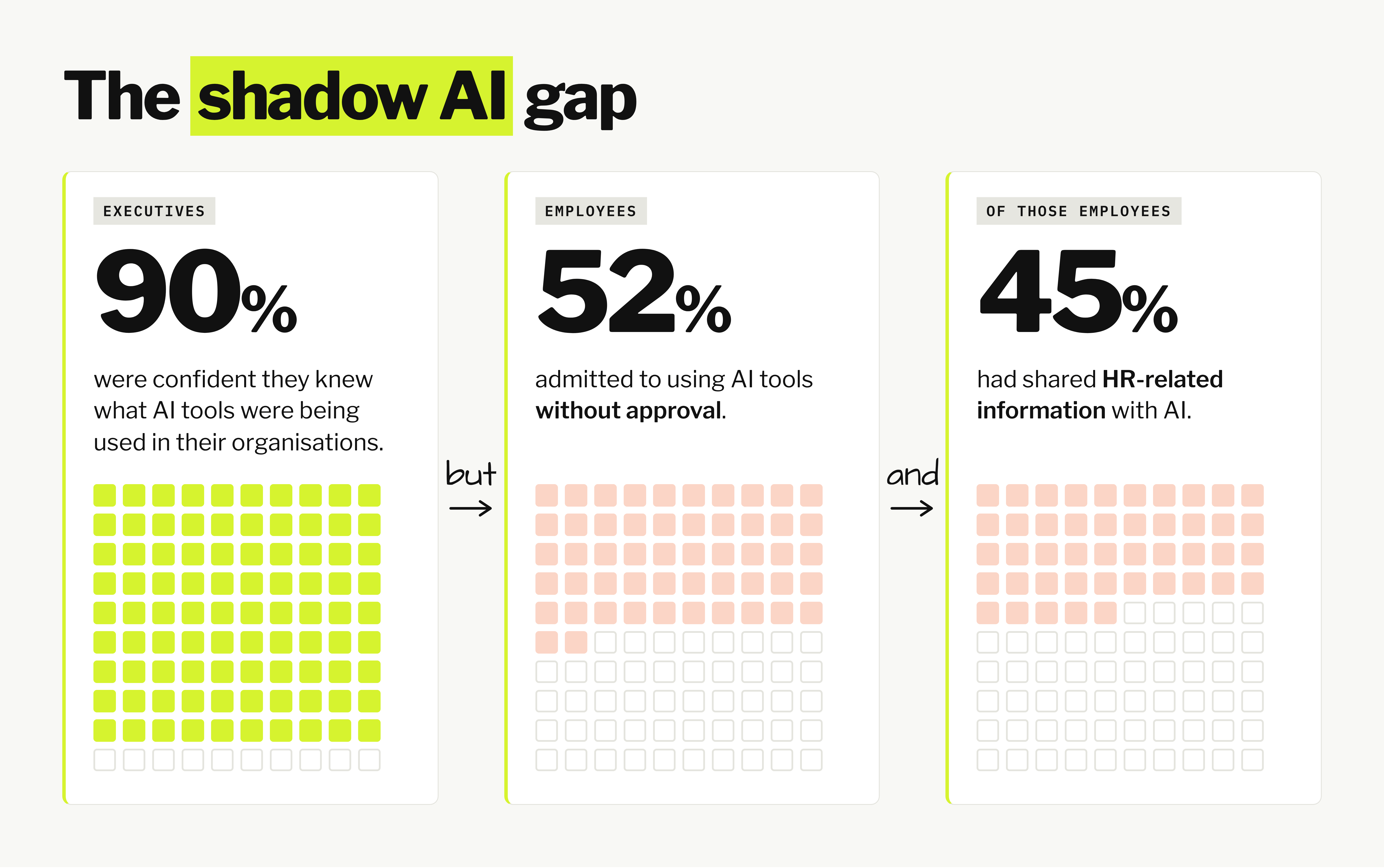
That last number deserves our attention. Because HR-related information isn’t necessarily being shared by HR professionals. Every manager in your company has access to some of it.
You can train your entire HR department on AI security and still have hundreds of people elsewhere in the organisation uploading performance reviews, interview notes and employee information to tools you’ve never heard of.
You might be using Shadow AI without realising it
When we talk about unapproved AI tools, most people immediately think of ChatGPT or Claude (because usually corporate roles have to use Copilot, which is so business effective since we already have Microsoft 365!).
But let’s look at a few less obvious examples.
The helpful meeting assistant
You’ve discovered an AI notetaker that produces excellent meeting summaries. You connect it to your work calendar and allow it to join your meetings automatically.
Next week, it joins a meeting about an employee grievance. Then a conversation about an upcoming restructuring. Then a meeting with a candidate.
Do you know where those recordings and transcripts are stored? Who can access them? How long are they kept? Can you permanently delete them?
Did anyone in your company check?
The innocent browser extension
You install a browser extension that helps you write better emails, summarise web pages or translate text.
Depending on the permissions you’ve granted, that little extension might be able to read the contents of the websites you visit — that’s the point, right?
Including your ATS. Your HRIS. Your compensation management system.
Something worth checking before you click Add to Chrome.
The approved AI tool in the wrong account
Your company has purchased an enterprise ChatGPT subscription, but you’ve been using your personal account for years. All your Projects, conversations and carefully crafted instructions are there. You’ve taught your AI your tone of voice, built up its memory and personalised it to the point where it knows exactly how you like to work.
So you continue using it for work.
Same product and possibly even the same model. But different contractual terms, data settings, administrative controls and ownership of the information you upload.
Approving a product doesn’t automatically mean approving every way of using it.
But I turned off model training!
Good. That’s worth doing.
Unfortunately, whether your data is used to train an AI model is only one of the questions you should be asking.
Even if the provider doesn’t use your conversations for training:
Your data may still be processed and stored on its servers.
Other service providers may be involved in processing it.
Your company may have no control over its retention or deletion.
Your employer may have no way to revoke access when you leave.
The provider may not have the contractual arrangements your company requires for processing personal data.
Turning off model training is a useful privacy setting. It doesn’t replace a security review or a data processing agreement.
Why are people doing this?
Imagine you are a recruiter. You’ve found an AI tool that could save you five hours a week. You ask your IT department whether you can use it.
Procurement needs to review the vendor or perhaps even run a tender (we want the best deal for the company, after all). Legal will try to negotiate the vendor’s standard terms and conditions. Information Security will insist on an Enterprise plan because it comes with more security features.
Everyone is doing their job. Three weeks later, you still don’t have an answer. The tool costs $20 a month, and you can start using it in approximately 30 seconds.
What do you think will happen?
I’m not suggesting that we skip security reviews. But if we want people to use AI responsibly, we need to make responsible AI use reasonably convenient.
And sometimes the problem isn’t even the approval process. The approved corporate tool simply doesn’t do what employees need it to do.
Shadow AI is a security risk, but it’s also a source of information about what your employees actually need.
As an HR professional involved in AI adoption, I would be very interested in understanding which unapproved tools people are using, what problems they are solving and why the official alternatives aren’t good enough — that’s essentially user research for your company’s AI strategy.
What can we actually do about it?
Here is where I would start.
1. Find out what your own team is using
At your next HR team meeting, ask everyone to share the AI tools they have used for work in the past month.
Not just chatbots. Ask about browser extensions, meeting assistants, slides generators, AI features in existing software and personal AI subscriptions.
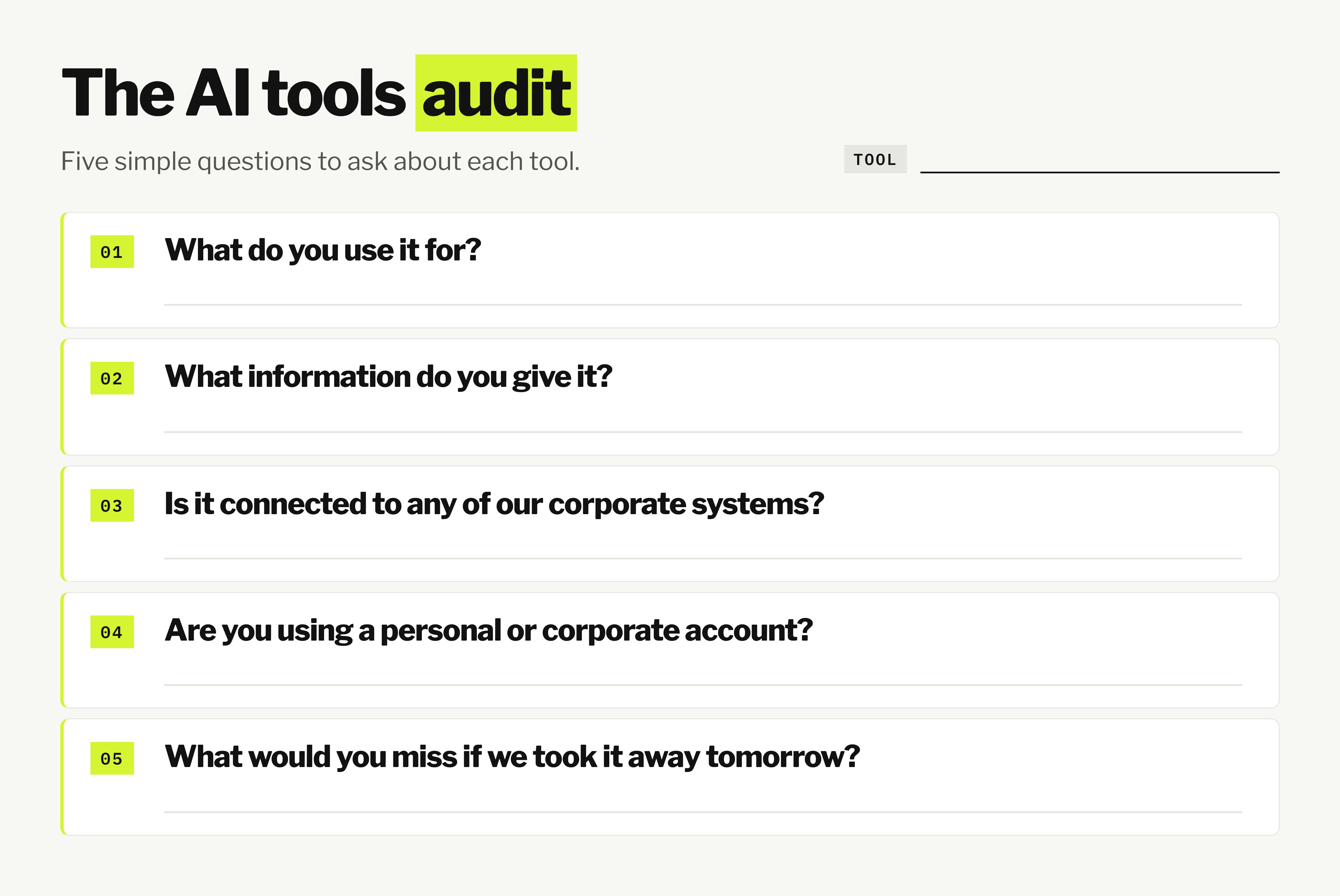
Make it clear that the purpose of this exercise is to understand how people work, not to catch someone breaking the rules.
Otherwise, you’ll get a very reassuring list that has very little to do with reality.
2. Learn to recognise the three levels of risk
Imagine you want to use AI to analyse employee compensation. The same task can involve very different levels of risk, depending on how you approach it.
🟢 Lower risk
You ask an AI tool to suggest ways to analyse salary distribution and provide Excel formulas to help you do it. You don’t share any actual employee data.
🟡 Higher risk
You upload a spreadsheet containing employee salaries and performance ratings and ask AI to identify compensation gaps and suggest salary adjustments.
🔴 Higher risk with ongoing access
You connect an AI agent to your corporate Google Drive and give it permission to read files whenever it needs them.
The difference between the second and third examples is particularly important. In the second case, you’ve shared a specific file. In the third, you may have given the tool ongoing access to information, including documents that didn’t even exist when you approved the connection.
3. Ask your IT team for help
If you’re an HR professional, here are a few questions you can take straight to your IT or Information Security colleagues:
Can employees give third-party AI tools access to corporate email, calendars or documents?
How can I check whether a particular AI tool has already been approved?
What should I do if I discover that someone has shared employee data with an unapproved service?
You don’t need to know how to investigate all of this yourself. You need to know who can help you.
4. Make the approved route easier
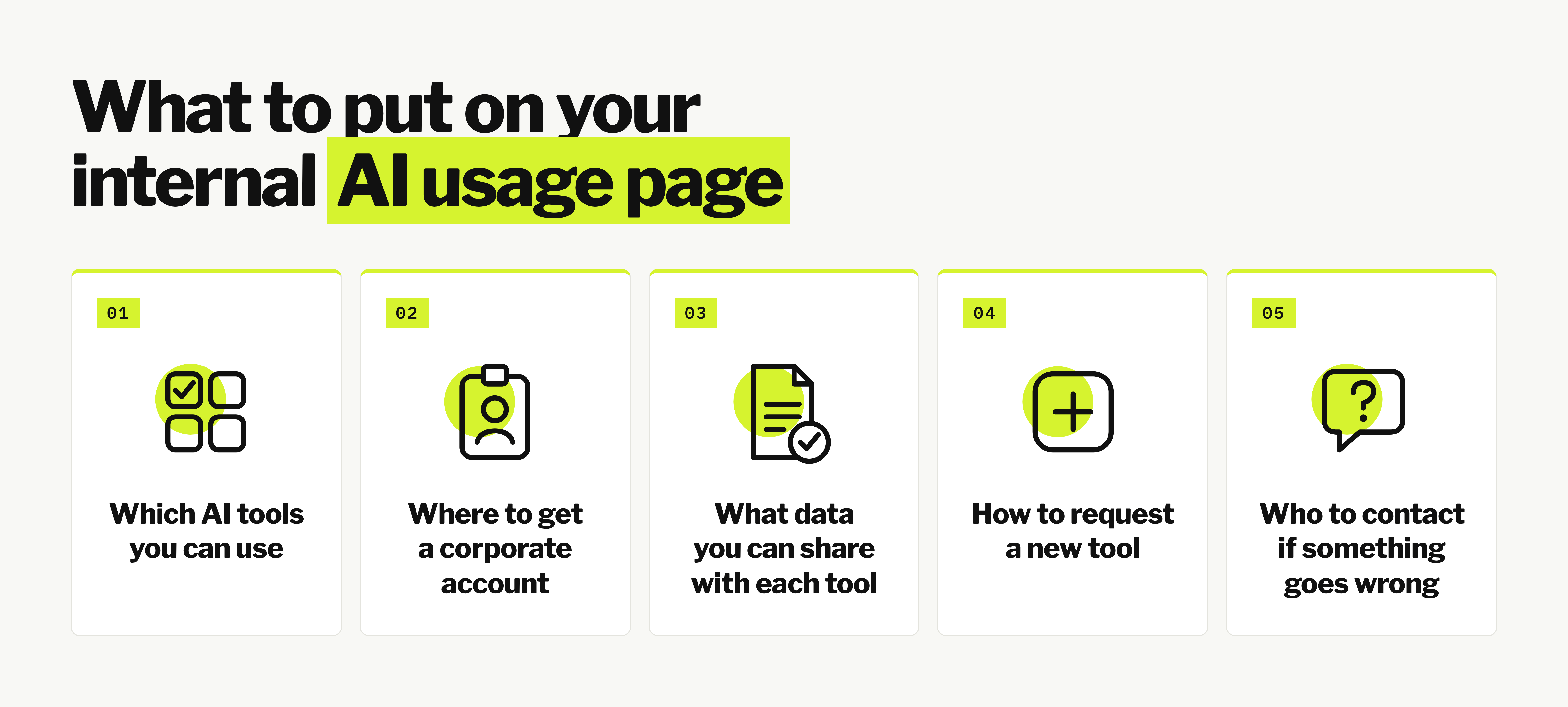
Give people a clear process and a reasonable timeframe for reviewing new AI tools.
And when someone asks for a new tool, don’t just ask why they need another AI subscription. Ask what they’re trying to achieve that they can’t achieve with the tools they already have.
You might learn something quite valuable.
What does successful AI adoption actually look like?
We spend a lot of time trying to convince employees to experiment with AI. We organise workshops, run hackathons, launch AI communities, appoint AI ambassadors and celebrate people who find creative ways to automate their work.
Then we are surprised when they start experimenting.
The challenge is to create an environment where employees can explore new technology without exposing their colleagues’ information or putting the company at risk.
I wouldn’t measure the success of AI governance by how many tools we’ve managed to ban — much more interesting is how many useful AI workflows we’ve managed to bring out of the shadows.
Does your company need an AI policy? 100%. Does anyone need another 25-page document full of phrases like responsible use of emerging technologies? Probably not.
Next week, let’s try to build an AI policy that employees might actually read, understand and use. Preferably before their next encounter with a shiny new AI tool.
And send this post to the colleague whose personal AI subscription has quietly become an unofficial corporate information system.
And by the way,
“—” does not necessarily mean a text was written by AI.
Press Option + Shift + - on a Mac.
Or Alt + 0151 on Windows.
You’re welcome.
Now you’re AI too.