


Connect Gmail. Connect Calendar. Connect Drive. Connect Slack.
Allow. Allow. Allow. Allow. Allow automatically. Don’t ask me again.
Here we go, the assistant that used to rewrite your job descriptions may be able to search your inbox, browse company files, create calendar events, update records, or send messages on your behalf.
Having an assistant that can actually get things done for you, rather than just tell you how, is a huge step forward. But it also means you need to understand what’s happening behind the scenes.
But things can go wrong even without anyone trying to trick your AI with prompt injection.
It can misunderstand you. It can misunderstand the data. It can choose the wrong tool. It can follow an entirely legitimate instruction in a way you did not expect.
An answer is not the same as an action
Imagine you ask ChatGPT to help you write a rejection email.
It produces something terrible. You sigh, rewrite it, and move on with your life.
Now imagine you have an agent connected to your ATS and email. A mistake suddenly has somewhere to go.
The AI does not just suggest the wrong candidate stage — it may be able to change it. It does not just draft the wrong email — it may be able to send it. It does not just misunderstand which candidate you mean — it may update the wrong record.
This is one of the biggest differences between using a model and using an agent.
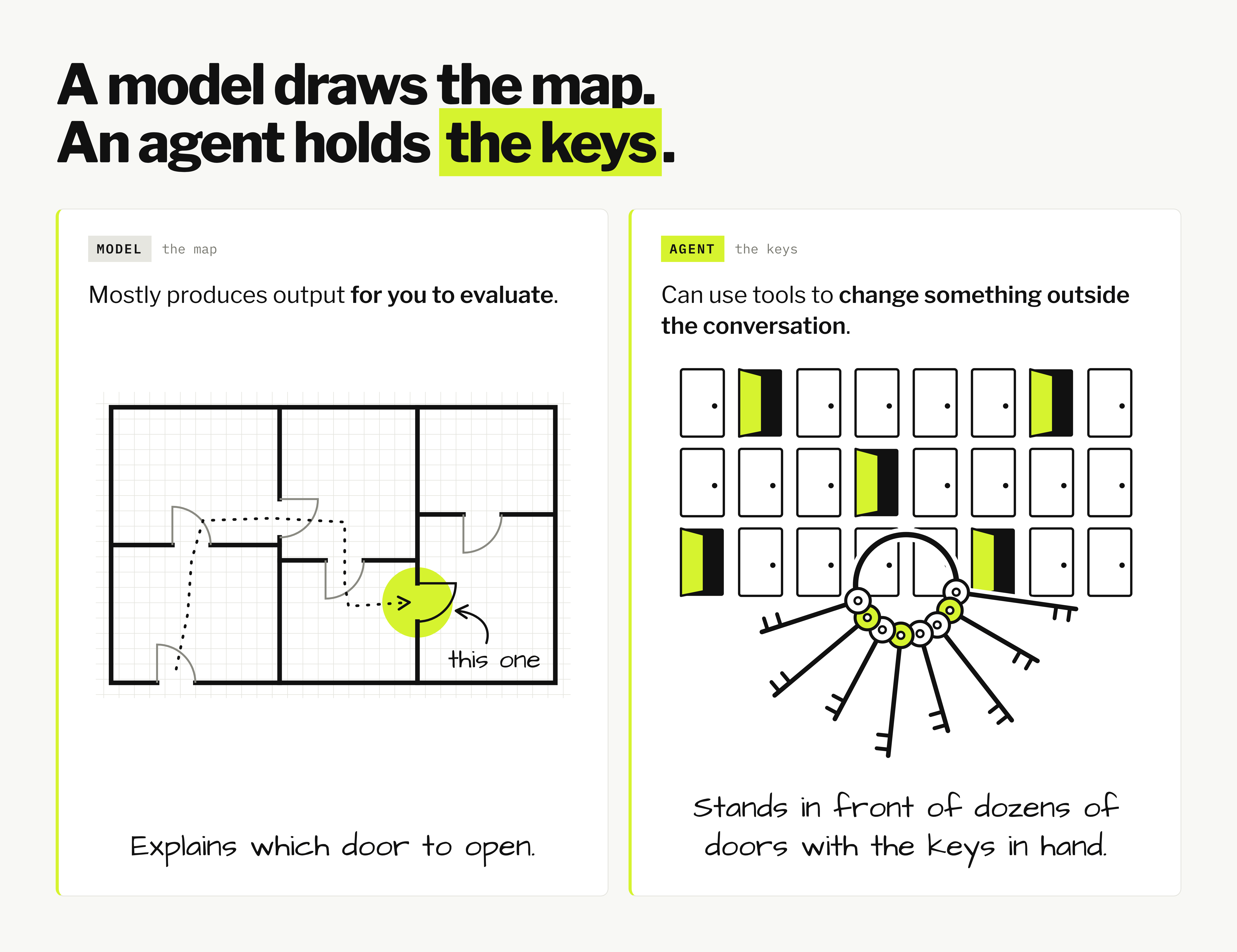
A model mostly produces output for you to evaluate. An agent can use tools to change something outside the conversation.
Let’s hire an AI recruiting coordinator
Suppose I want an agent to take care of interview scheduling.
What does it actually need?
Probably access to the candidate’s name and contact details.
It needs to know who the interviewers are.
It needs to see when those people are available.
It may need to create a calendar event.
Perhaps it needs a scheduling-email template.
And depending on the workflow, we may want it to send that email automatically.
So far, so good.
Now let’s look at what it doesn’t need.
It does not need access to payroll.
It does not need employees’ performance reviews.
It does not need every document in Google Drive.
It probably does not need permission to delete candidates.
It does not need to change compensation data.
It does not need administrator access to the ATS.
And if its job is only to propose interview slots, it may not even need permission to send the email.
That is the principle of least privilege in normal language: Give something only the access it needs to do its job.
Not the access it might conceivably need one day. Not everything you personally have access to. Not everything the integration offers because clicking Allow all is easier. Just what the job requires.
This is not a new AI idea. Security teams have been applying the same principle to human users, applications and service accounts for years.
AI agents simply give us an excellent new opportunity to forget it.
Your permissions are not your agent’s job description
This is where things get particularly easy to get wrong.
I am the CHRO. I may legitimately have access to salary data, performance reviews, employee relations cases, candidate records and organizational plans. That access may be perfectly reasonable for me.
Now suppose I connect an AI assistant using my account. Should the agent automatically be able to reach everything I can?
Of course not.
My calendar assistant does not need my compensation data just because I am allowed to see it.
My recruiting agent does not need access to confidential employee-relations files just because both systems happen to sit behind the same company login.
Your own access defines what you are authorized to do. It should not automatically define what every AI acting on your behalf is authorized to do.
And security researchers increasingly treat agents exactly this way: as entities that need their own identity, scope and permissions rather than simply inheriting a human user’s full authority. Recent NIST guidance goes even further and recommends least or zero standing privilege: an agent should hold no persistent rights it does not need and receive narrowly scoped access when the task requires it.
Sounds technical. The practical idea is not.
The fact that I have the master key does not mean I should make ten copies and hand one to every assistant I use.
“Access” is not one permission
Another useful mistake to avoid is thinking about access as binary.
Either AI has access to the ATS or it does not. That is far too primitive.
Read is different from write. One candidate record is different from the entire candidate database. For the next ten minutes is different from forever.
For an HR agent, I would think about permissions across five dimensions:
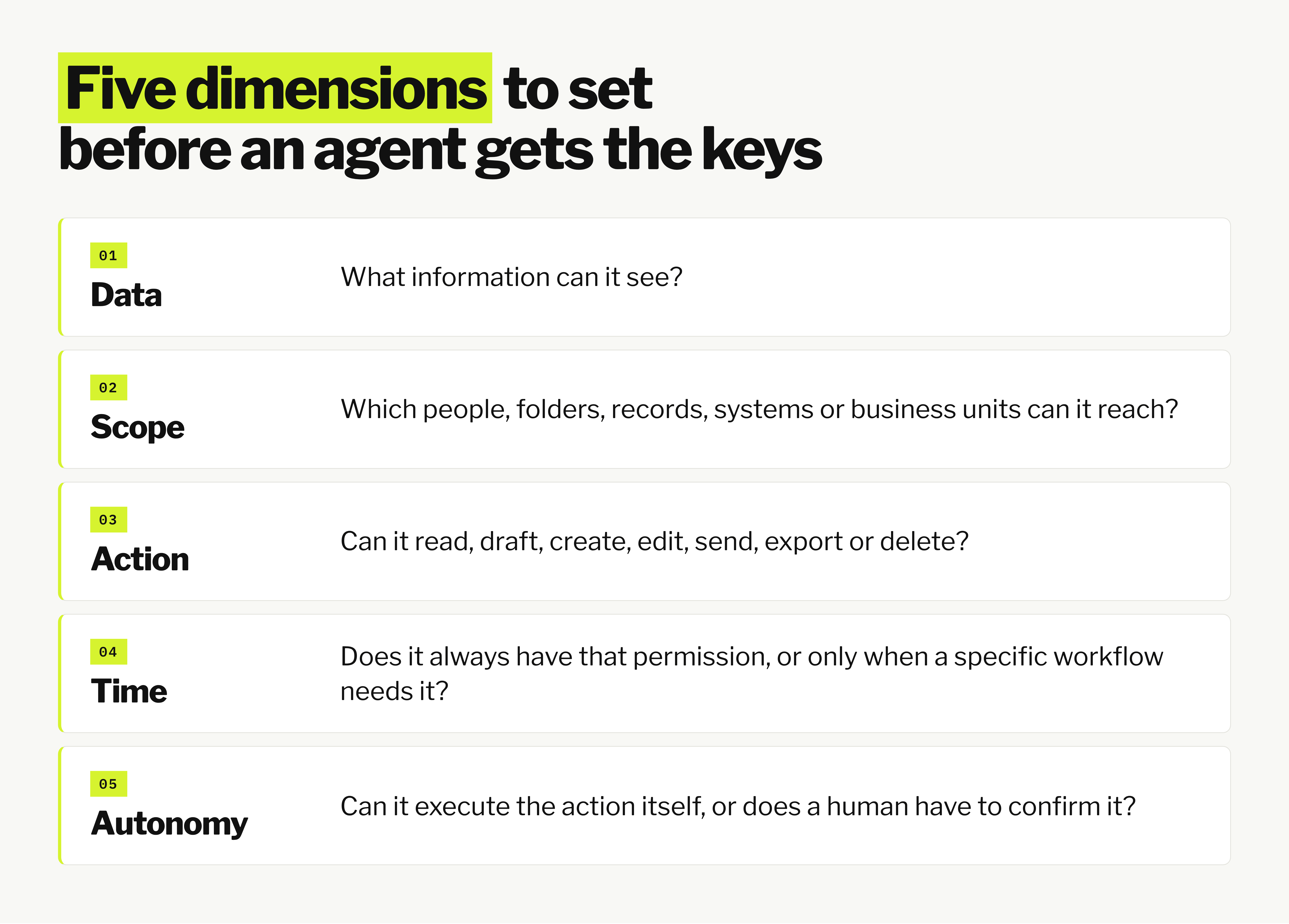
This is much more useful than asking, “Does it have access to Workday?”
Access to do what in Workday? That is the question.
There is a huge difference between “draft” and “send”
This is probably the easiest control to understand without knowing anything about cybersecurity.
Let AI prepare the action. Make a human approve the consequential part.
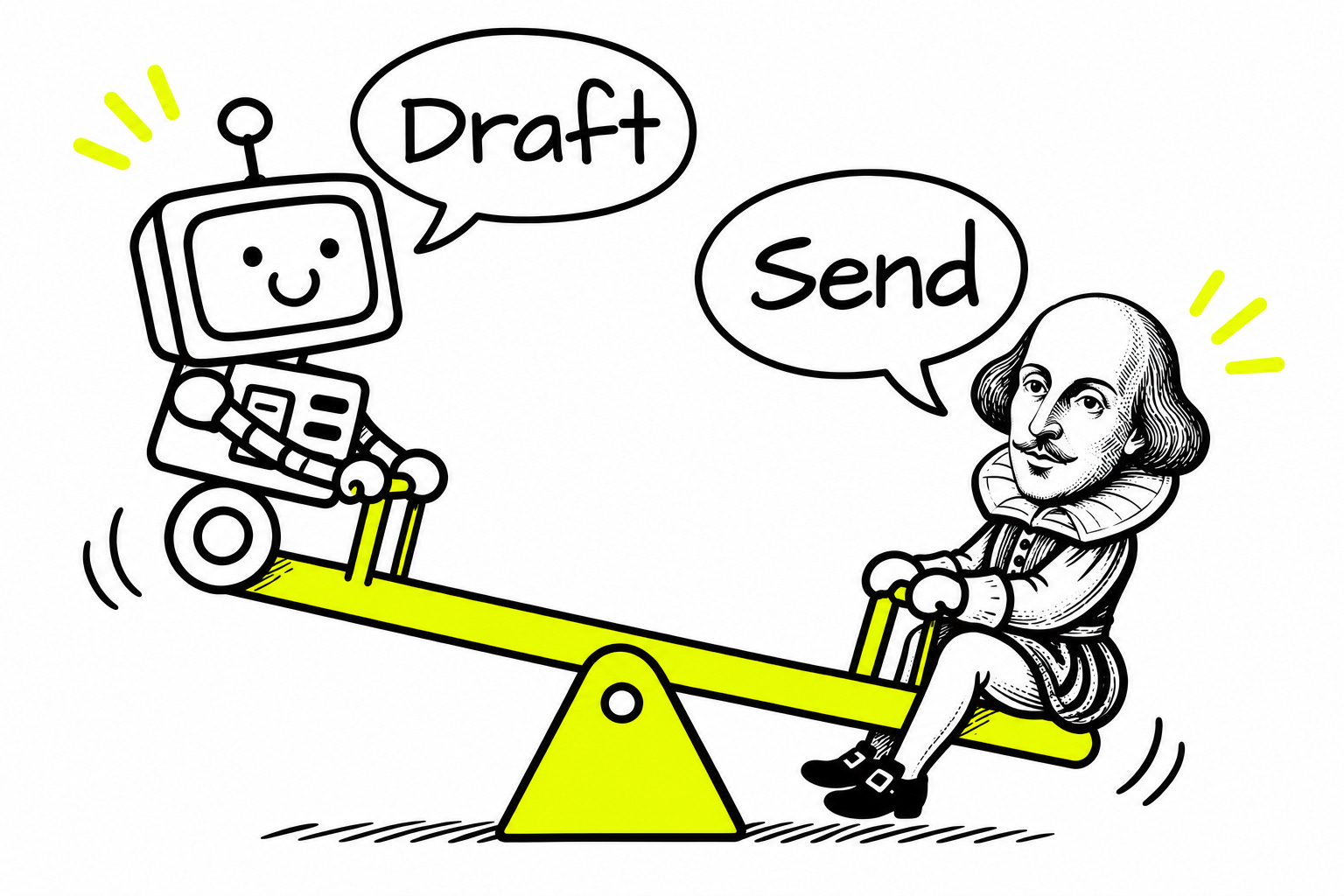
AI can draft the candidate rejection — human sends it. AI can propose changing a candidate from Interview to Reject — human confirms the stage change.
This is usually called human in the loop, and you will see that phrase everywhere in discussions about AI governance.
But do not put an approval button after every microscopic action. If your agent asks:
May I open the candidate profile?
May I read the interview notes?
May I check the calendar?
May I draft an email?
May I breathe?
…people will eventually click Allow without reading anything.
Put human approval where the consequence changes: drafting becomes sending or recommendation becomes decision. That is where human judgment is actually useful.
OWASP describes the broader risk as Excessive Agency: giving an AI system too much functionality, too many permissions, or too much autonomy. Its recommendations include minimizing permissions and requiring human approval for high-impact actions.
Again: intimidating terminology, very normal idea. Don’t give the machine five ways to cause damage when it needs one way to do useful work.
“Never delete anything” is not access control
You can absolutely tell an agent:
Never delete candidate records.
Good instruction. Keep it.
But if the agent’s credentials still allow it to delete candidate records, you have not actually removed that capability. You have asked the AI nicely not to use it — those are not the same thing.
The stronger design is: the agent cannot delete candidate records because the system does not give it permission to do so.
Now it does not matter whether the model misunderstands your instruction, follows a malicious one, or simply behaves strangely. The dangerous action is unavailable.
This is why access control should live outside the prompt whenever possible.
The prompt explains what good behaviour looks like. The permissions define what behaviour is technically possible.
What happens after the agent acts?
There is one more question people tend to ask only after something strange happens:
Can we see what it did?
Suppose an employee record changes unexpectedly.
Who initiated the workflow? Which agent made the change? What information did it access first? Which tool did it use? What action did it take? Was a human asked to approve it? Who approved it? When did all of this happen?
An agent that can take actions should leave an audit trail. And ideally the agent should not be able to quietly rewrite that trail itself.
Before you connect another AI agent
You do not need to become your company’s security architect. But if somebody proposes connecting an AI agent to your HR systems, you should be able to ask these questions:
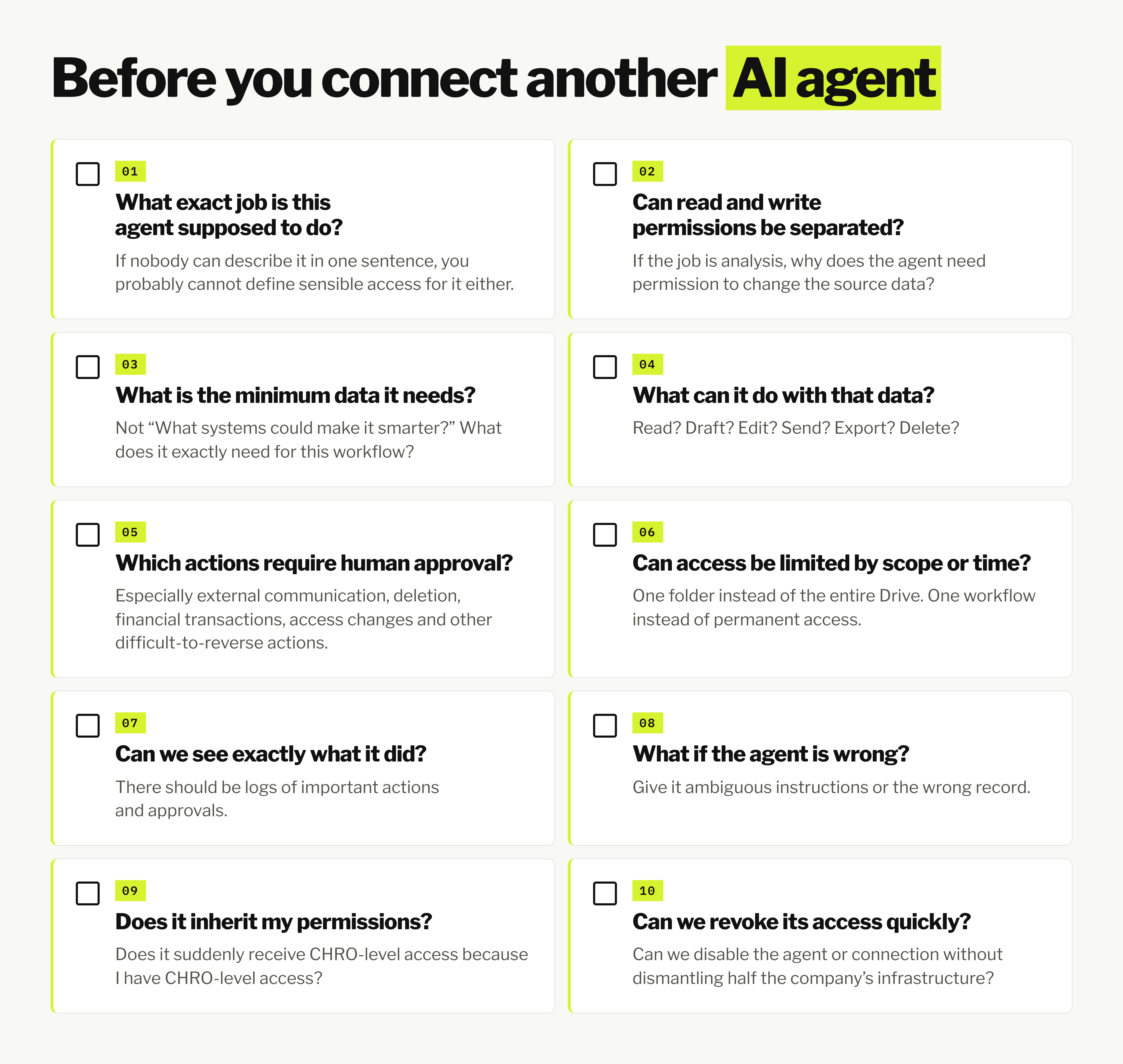
We have already spent several posts trying to break Skills before trusting them with real work. Agents deserve the same treatment.
Design for the mistake
The goal is to make AI useful without giving it unlimited freedom.
An agent that has to ask permission to read every email, open every document, or create every calendar event would drive everyone insane. But an agent that can do anything without asking is hardly a better option.
The trick is knowing where to draw the line.
Let your agent handle routine tasks without constant supervision. But require approval when it comes to sensitive data, important decisions, or actions that are difficult to undo.
And remember: sooner or later, something will go wrong.
You cannot prevent every mistake. What you can do is limit the damage.
That’s what good access control is for. If an agent doesn’t have permission to delete employee records, it cannot accidentally delete them. If it cannot send emails without approval, a bad draft stays a draft.
Your AI can still do its job. It just can’t do everything else.
So now we know how to limit what an approved AI tool can see and do. But meanwhile, somebody has just pasted a compensation spreadsheet into a free AI tool you have never heard of.
Next week, let’s talk about Shadow AI — and what happens when people connect company data to tools nobody approved, reviewed, or perhaps even knows exist.
Send this to the colleague who trusts their AI assistant more than they trust their own employees.
And by the way,
“—” does not necessarily mean a text was written by AI.
Press Option + Shift + - on a Mac.
Or Alt + 0151 on Windows.
You’re welcome.
Now you’re AI too.
We’d add one check before the scheduling agent goes live. Using the agent’s own connection in a test environment, try to delete a dummy candidate record and make sure the recruiting system blocks it. Then reconnect the integration and run the same check again. That shows whether the restriction still holds with the newly granted access.